

Here Are the Questions We’ll Answer
- How do I manage my booking with Helpling?
- Helpling Postpone or cancel booking: This is how it works
- How do I cancel a single appointment?
- How can I withdraw an open booking request?
- How do I cancel recurring cleaning?
- When are cancellation costs due?
- Can I reschedule an appointment?
- How do I change regular bookings?
- Can I change a booking request that is still open?
- How do I change the cleaner?
- What to do if the cleaner doesn’t show up?
- And if the service provider cancels at short notice?
- How can I change my address?
- Can I change my address after the booking has already been accepted?
- Do I have to provide cleaning products?
- How do I prepare for the first cleaning?
- Do I have to be at home during cleaning?
Have you booked your cleaning with Helpling and would now like to know what happens next? Maybe you want to reschedule an appointment, adjust an address, or discuss additional requests with your cleaner. In this article, you will learn exactly how this works.
We’ll show you step by step how to easily manage your booking. Everything runs digitally. No paperwork, no phone calls. Whether you need to make changes, cancellations, or rebookings, you can do all of this directly in the app.
In this guide, you will find answers to the most frequently asked questions so that you don’t have to worry about cleaning. Let’s go!
How Do I Manage My Booking with Helpling?

As soon as your booking request has been accepted, you will immediately receive a confirmation. You will find all the important information, including:
- Appointment
- Address
- Selected services
- The name of your cleaner
Your personal user account is even more practical. All relevant information is available there at any time:
- You can view scheduled appointments, make changes, or postpone them if necessary.
- Communication with your cleaner also takes place directly in the portal, which saves time.
Would you like to clarify a query, make a specific request, or create additional tasks? No problem. You can reach your cleaner at any time before the appointment using the message field in your profile.
The whole system is designed to give you maximum flexibility, transparency, and control. It’s very convenient and intuitive to use, leaving you more time for the important things in everyday life.
Postpone or Cancel Bookings: This is How it Works

Sometimes plans change. This is completely normal. With Helpling, you have the opportunity to manage your booking flexibly. Whether you want to cancel a single appointment, choose a new time, or stop your regular cleaning completely, all of this can be organized with just a few clicks.
How do I cancel a single appointment?
If you cannot keep a cleaning appointment, simply log in to your user account.
- In the “Home” area, you can select the booking you want to edit.
- Then click on the next appointment.
- There you will find the option “Cancel appointment.” As soon as you select this, the appointment will be canceled.
Please note: Cancellation is possible for up to 48 hours before the appointment. In this case, the cleaner can then charge a compensation fee for the loss of earnings.
How can I withdraw an open booking request?
If you have made a request that has not yet been confirmed, you can terminate it at any time:
- To do this, send a short message to kontakt@helpling.de.
- Alternatively, you can reach the customer service team by phone from Monday to Saturday, between 8:00 and 17:00.
How Do I Cancel My Recurring Cleaning?

If you want to stop your regular cleaning, you can do this easily using your user profile:
- To do this, go to the “Home” area of your account. There you can see all your active bookings at a glance.
- Select the cleaning in question and click “Make a change to your entire order” and then press “Edit”, then scroll down and then “Cancel”.
- In the next step, you confirm the cancellation.
- As soon as everything is successfully completed, you will receive a confirmation by email, including all relevant details about completing the booking.
Please note: If you cancel an upcoming cleaning less than 48 hours before the scheduled appointment, the cleaner may charge a compensation fee. This deadline serves to give the cleaner planning security and to avoid unnecessary failures.
If you have any questions about the process or are unsure whether cancellation is really necessary, customer service will be happy to help you. This means you always retain control over your booking and can react flexibly to changes.
When are Cancellation Costs Due?
In principle, every cancellation up to 48 hours in advance is free of charge. The shorter you cancel, the higher the compensation can be:
- Between 24 and 48 hours: up to 25 percent of the price
- Between 12 and 24 hours: up to 50 percent
- Under 12 hours: up to 100 percent
If the appointment is not carried out because the service provider does not have access to the apartment, the full price can also be charged. The service provider decides for themselves whether a cancellation fee is charged.
Can I Reschedule an Appointment?

Yes, that is possible without any problems. To do this, go to your user account and open the affected order.
- Under “Next Dates,” click on the desired date.
- There you will find the option „rebook an appointment“.
- Choose a new date and time. The change must then be confirmed by the service provider.
This should also happen 48 hours before the start of the appointment; otherwise, a compensation fee could apply. So that there are no misunderstandings, we recommend sending a short message to your cleaner in advance.
How Do I Change Regular Bookings?
If you want to adjust the time, duration, or frequency of your recurring house cleaning, you will also find the right function for this in the user account:
- Open the order and select “Rebook.”
- Then adapt all details to your new needs.
- The same applies here: the service provider must confirm your changes.
Can I change a booking request that is still open?
Unfortunately, a request that has already been sent but not yet accepted cannot be processed directly.
- If your plans change, it is best to submit a new booking request.
- Or you can contact the customer service team by email or telephone, and they will be happy to help you.
How Do I Change the Cleaner?
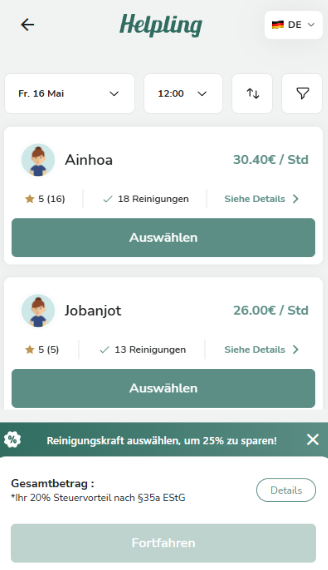
If you prefer to work with someone else, you can easily swap out your current cleaner:
- In the user account, click on the entire order and then click “Replace.”
- There you will find the option “Change service provider.”
Follow the next steps on the page to update your selection.
What should you do if the cleaner doesn’t show up?
If your cleaner doesn’t show up on time for the appointment, wait a few minutes first.
- You then have the option of contacting the service provider directly or reporting a problem via your user account.
- In the service portal, you can let us know under “Report a problem” that the service provider did not show up, and if you want a replacement, then we will get back to you by phone within 20 minutes
- You can cancel the booking or request a new date.
What should you do if the service provider cancels on short notice?
If you receive a cancellation shortly before the appointment, you can organize an alternative appointment or postpone the original appointment via the service portal.
- Simply log in, select the appointment, and click “Report a problem.”
- All the necessary options are available to you here.
- If necessary, the customer service team will also help you coordinate.
How Can I Change My Address?
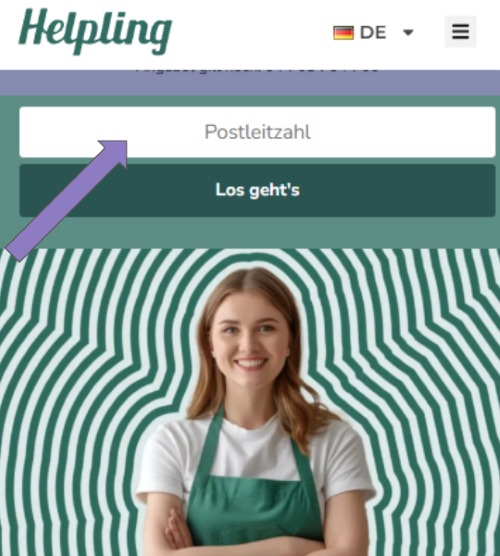
If you don’t currently have an ongoing order with Helpling, changing addresses is very easy: start a new booking and first enter the zip code of your new place of residence. You can provide your new address as the booking process progresses.
Can I change my address after the booking has already been accepted?
If regular cleaning appointments have already been arranged with a cleaner, the change of address looks a little different. In this case, you change the address directly via your customer account:
- To do this, go to the “Overview” area and select the “Customize order details” option for your existing booking.
- There you will find the “Change home address” button.
- After clicking, a form will open in which you can enter your new address.
- Alternatively, you can also select an address that has already been saved.
- Important: Please confirm that you have already discussed the new location with your cleaner.
After submitting, your cleaner will be automatically informed and asked to confirm the change of address. Once this is done, you will receive an email notification that the change has been completed.
Important to know: If the new location cannot be reached by your cleaner or the move has not been coordinated with her in advance, the booking can be canceled. In this case, you will have the opportunity to book a new cleaner for your new address.
Do I Have to Provide Cleaning Products?

As a rule, cleaners do not bring their own cleaning products or cleaning supplies. There are two reasons for this: Firstly, the logistical effort for transport and storage is high. On the other hand, many customers prefer that only the products they trust are used in their own home.
So that your cleaner can get started straight away, we recommend that you provide all the necessary cleaning products and utensils before your appointment. This ensures that the work can be carried out efficiently and according to your ideas.
This basic equipment has proved its worth:
Cleaning agents:
- All-purpose cleaner
- Glass cleaner
- Toilet cleaner
- Dishwashing detergent or a grease-dissolving product
Cleaning materials:
- Vacuum cleaner
- Broom and hand brush
- Mop with a matching bucket
- Gloves
Cleaning textiles:
- Four clean microfiber cloths
- Scratch-free sponges
- Feather dusters or dusters
If you are not sure which materials are needed for your planned cleaning, it is worth a quick exchange in advance. Simply use the messaging function in your customer area and ask your cleaner directly. This way, you avoid misunderstandings and ensure everything runs smoothly.
How Do I Prepare for the First Cleaning?

A good start lays the foundation for a long-term, pleasant collaboration:
- Therefore, take some time during the first cleaning to greet your cleaner personally. This creates trust and gives you the opportunity to discuss your expectations and priorities directly.
- Walk through your apartment or house together. Show which areas are particularly important or where there are sensitive surfaces. Perhaps there are pieces of furniture that need to be treated with special care products or places that are often overlooked. The more clearly you formulate your wishes, the better the cleaner can adapt to your ideas.
- It is also helpful to prepare a short checklist or a small note. You can then write down in bullet points what needs to be done and what you need to pay particular attention to. This not only saves time but also ensures that nothing gets forgotten.
- Also, don’t forget to have all the necessary cleaning products and materials ready. If you have any questions about this, we recommend contacting us in advance using the messaging function in the customer profile. This means both sides start the first appointment well prepared.
Do I Have to Be at Home During Cleaning?

Whether you are present at the appointment or not is entirely up to you. However, especially at the first appointment, it is advisable to welcome your cleaner personally. This gives you the opportunity to discuss everything important directly, express special wishes, and show what is important to you.
If you cannot be there at the agreed time, that is also no problem. In this case, you should contact your household helper in good time. Clarify in advance how access to the apartment is regulated –e.g., via a neighbor or a stored key– and indicate which tasks should be completed. This will ensure that everything runs smoothly, even when you are not at home.
Conclusion
With Helpling, you retain control over your bookings at all times. You decide when, how often, and with whom cleaning takes place. Changes can be implemented flexibly. And if something comes up, customer support is there for you. This makes household cleaning plannable, reliable, and stress-free.