



Here are the questions we will answer
-
- Everything About Managing Your Booking
- How Can I Change My Cleaner After Booking?
- How Can I Give My Cleaner Feedback?
- How Do I Recommend My Cleaner to Others?
- What Do I Do if My Cleaner Damages Something?
- Am I Insured in the Event of Damage?
- How Do I Contact My Cleaner Directly?
- How Much Time Should I Allow for Cleaning?
- I Wasn’t Happy With the Cleaning; What Should I do?
- What Happens if My Cleaner Needs More or Less Time?
- My Cleaner Didn’t Show Up. What Should I Do?
- Should I Give My Cleaner a Key?
- My Cleaner is Leaving Helpling. How Do I Find a Replacement?
- My Cleaner is on Vacation, How Can I Replace Them?
- I Had a Cleaner That I Liked. How Can I Book Them Again?
- Everything About Your Booking Details
- How Can I Change the Time or Date of My Individual Booking?
- How Can I Change My Billing Address?
- How Can I Request the Deletion of My Data?
- How Do I Change My Address?
- Is There a Contract Term?
- Is There a Minimum Booking Period?
- How Can I Change My Payment Details?
- How Much is the Service Fee?
- How Do I Know if My Invoice Has Been Paid?
The booking is complete, and the confirmation is there. And now? You may be wondering what happens next. Should you tell your cleaner anything else? What happens if your schedule changes? Or if you are not completely satisfied with the first cleaning?
These are all questions that concern many customers after their first booking with Helpling. That’s why we’ve put together this guide for you. It helps you get the most out of your service without any stress.
We’ll show you how you can contact your cleaner directly, what to do if something gets damaged, and how to easily book follow-up appointments.
Our goal is to give you clarity. Not with long explanations, but with precise answers. This way, you know exactly what is important and can sit back and relax while your home is in the best hands.
Everything About Managing Your Booking

In this section, you will learn how to reach your cleaner, what to do in the event of damage, and what options are available if something doesn’t go as planned. Because good preparation creates trust and lays the foundation for long-term, pleasant collaboration.
How Can I Change My Cleaner After Booking?
Have you booked your cleaner, but would rather have someone else? No problem. If you’re not satisfied with your current cleaner or simply prefer someone else, Helpling offers a straightforward way to change service providers:
-
-
- Log in to your Helpling account and access the corresponding booking.
- There, you have the option of deselecting the current service provider and requesting a new suggestion.
- It is helpful to leave a short note during this process. This means the new cleaner knows straight away what is particularly important to you and can prepare well for the appointment.
-
If you have any questions about the change or need help with it, you can check the Helpling help portal or contact our customer service at any time: by phone, email, or directly via chat in the customer section. The team will be happy to support you in finding the right solution.
With these steps, you can ensure that your household cleaning continues to meet your expectations
How Can I Give My Cleaner Feedback?

Constructive feedback is not only helpful, but also welcome. Many cleaners would be happy if you told them personally after the appointment what you liked or where there is room for improvement. Direct exchange creates trust and helps to implement your wishes even better in the future.
If you would prefer to provide your feedback digitally, you can easily do so via your customer account.
-
-
- To do this, open your booking overview on the website or in the app.
- There you will find the “Dates” area.
- Click “Past Appointments” to select a completed cleaning.
- You then have the opportunity to give a star rating between 1 and 5.
- You can also leave a short comment. Please describe here what was particularly good or what should go differently next time.
-
These reviews not only help the cleaner to develop further, but also help other customers to choose the right professional. Honest, respectfully formulated feedback makes a difference for everyone involved.
How Do I Recommend My Cleaner to Others?
Are you satisfied with your cleaner and would you like to recommend her to friends or family? With Helpling, you can easily do this directly via your customer account.
The most convenient way to recommend is directly in the Helpling app:
-
-
- There you will find the profile of your cleaner in your booking overview.
- With just a few clicks, you can generate a personal recommendation link and share it with others.
-
Sharing is also possible using the desktop version:
-
-
- View your past appointments and click on your cleaner’s profile picture.
- In the detailed view, you will see the option to copy and forward the link to the profile.
-
This enables others to also benefit from reliable service, and your cleaner can look forward to receiving new bookings. A small click can have a big impact!
What Do I Do if My Cleaner Damages Something?

Even with the utmost care, it can happen: an object falls to the ground, a device is accidentally damaged, or a sensitive surface gets scratches, and if something breaks during the cleaning appointment, it is important to act quickly.
Please report the damage in the Helpling service portal as soon as possible after the cleaning appointment:
-
-
- There you will find the “Submit damage report” area, through which you can submit all relevant information.
- This will ensure that your request is forwarded directly to the responsible department.
-
Do you use the Helpling app? Make sure your app is up to date so that all functions work smoothly. Then simply select the appropriate date and answer the questions that appear:
-
-
- What was damaged?
- How did the damage occur?
- How high do you estimate the value of the damaged item?
-
Please add clear photos that show the damage. If available, also upload the original invoice. Alternatively, a cost estimate is sufficient. If proof is still missing at the time of reporting, you can also submit it later. The Helpling claims team will always contact you.
Am I Insured in the Event of Damage?
Yes, cleaners who offer their services on the Helpling platform are covered by business liability insurance:
-
-
- Damage of €500 or more is covered by the liability insurance of the cleaning staff, provided. In these cases, Helpling takes over the reporting to the insurance company.
-
If the damage is below this limit or only affects the deductible, a direct agreement with the cleaner is possible and is often the fastest way. In many cases, uncomplicated solutions can be found, for example, a pro rata refund, payment in installments, or repairs.
Our tip: Document the damage well and keep in touch with your cleaner. Clear communication helps to avoid misunderstandings and quickly find a fair solution.
How Do I Contact My Cleaner Directly?

Would you like to send your cleaner a message, for example, to discuss a special request or leave important information about access? No problem. Once your booking has been confirmed, a messaging feature will be available in your Helpling account.
-
-
- Simply log in to your profile, open the corresponding booking, and click on the “Send message” button.
-
You can use this function to contact your cleaner quickly, directly, and safely. This means that small details can be clarified in advance without going through customer service.
How Much Time Should I Allow for Cleaning?
This depends on the size and condition of your apartment. As a rule of thumb, 1.5 to 2 hours per 50 m2 if cleaned regularly. More time may be needed for intensive cleanings. If you are unsure, ask your cleaner directly for a realistic assessment.
I Wasn’t Happy With the Cleaning; What Should I do?
Sometimes the result of a cleaning does not quite meet your expectations. In such cases, it is best to speak to the cleaner directly, ideally while they’re still in your home. This means that the person can make immediate improvements if necessary, and misunderstandings can be quickly avoided.
If a direct conversation was not possible or if you would like to discuss the situation afterwards, our customer service will be happy to help. Please contact us promptly via your Helpling account so that we can find a solution together. We will then forward your request to the person responsible, the solo self-employed person, and support you in the next steps.
What Happens if My Cleaner Needs More or Less Time?

If the cleaner needs more time, then it can be extended with your consent. If the cleaner finishes faster, you will only have to pay for the hours they actually worked. Changes should be adjusted directly in the app or online.
My Cleaner Didn’t Show Up. What Should I Do?
Please wait 15 minutes first if there is a delay. Otherwise, from the planned start of your booking, you can report a problem directly in your Helpling account:
-
-
- To do this, open the customer portal and select “Report a problem.”
- There you will find the option “My cleaner didn’t show up.”
- Select the appropriate date and follow the instructions.
-
Depending on the situation, you have several options: You can contact us directly by phone, send a message, or (if you want to wait a little longer) reopen the request later and, if necessary, cancel the appointment.
Tip: Anyone who uses the Helpling app should make sure that it is up to date. This means that all functions are fully available to you, and you can react quickly if something doesn’t go quite according to plan.
Should I Give My Cleaner a Key?
That’s entirely up to you. Many customers turn in a key for recurring bookings, clarify the details directly with your cleaner. For your security, we recommend handing over the keys in writing.
Please note that Helpling assumes no responsibility for handing over, exchanging, or returning keys. Possible key loss is also not covered by the liability insurance provided through Helpling.
My Cleaner is Leaving Helpling. How Do I Find a Replacement?

You will receive a notification when your cleaner is no longer available. Helpling will automatically make you new suggestions based on your previous bookings and reviews.
My Cleaner is on Vacation, How Can I Replace Them?
You can request representation for the desired period via your customer account. Please indicate that this is a holiday replacement. This way, Helpling can suggest better-suited cleaners.
I Had a Cleaner That I Liked. How Can I Book Them Again?
Did you have a cleaner whose work you were particularly satisfied with? Then you would probably like to book them again. This is very easy.
First, log in to your Helpling account. Select the desired service under the menu item “Book a service.” You then have the option of either finding a new cleaner or specifically booking someone with whom you have already had good experiences.
If you select a specific person, your request will only be sent to that cleaner. As soon as she confirms the appointment, you will receive your booking confirmation by email as usual.
Important to know: If your preferred cleaner is not currently available, it will not be displayed in the selection. In this case, you can either choose a different date or choose an alternative cleaner.
Everything About Your Booking Details
A smooth cleaning service begins not only with the right cleaner, but also with clear booking details. You may want to update your address, change the time of an appointment, or learn how to customize your payment method. In this section, you will learn how to manage your booking flexibly.
How Can I Change the Time or Date of My Individual Booking?
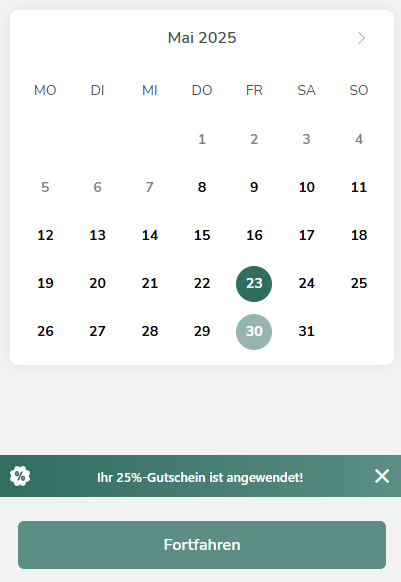
Sometimes the daily routine changes faster than planned, due to appointments, guests, or unexpected obligations. At Helpling, you can flexibly adjust individual cleaning appointments.
-
-
- To do this, log in to your Helpling account and go to your active booking in the start area (“Home”).
- There you will find an overview of your planned cleanings under “Upcoming dates.”
- Select the appointment you want to reschedule.
- In the appointment overview, click on “Rebook appointment.”
- Here you can change the date, time, or duration of the appointment.
-
Important: The cleaner must first confirm the new changes. If no confirmation is received, the original date remains. In this case, you may need to cancel separately or send a new suggestion.
Our tip: Discuss the desired change with your cleaner in advance. This will help you avoid misunderstandings and ensure that the new time works well for both of you..
How Can I Change My Billing Address?
Have you moved or would you like to adjust your billing address for other reasons? No problem, you can easily update the address in your Helpling account for future bookings.
To do this, log in to your user profile and access the overview of your existing bookings. Select the relevant order and click “Edit.”
You can then change your billing address for all upcoming dates of this booking under the menu item “My Home.” The update will take effect from the next date.
If you would like invoices that have already been issued to receive a new address, please contact customer service directly, preferably by email (kontakt@helpling.de). The team will be happy to help you.
How Can I Request the Deletion of My Data?
If you would like to delete your account and data, please send a request to customer service or use the feature in the privacy section of your account. The data deletion is GDPR-compliant.
How Do I Change My Address?
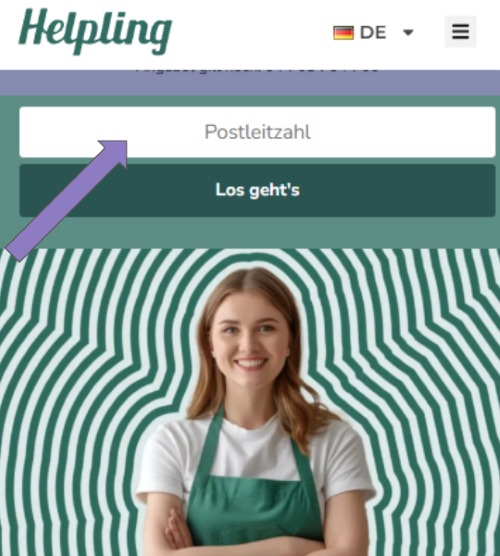
Are you moving? No problem, with Helpling, you can easily change your address. Depending on whether you currently have an ongoing order or not, the steps differ slightly.
-
-
- If you don’t currently have an active booking:
Start a new booking via your customer account. Once you have entered your zip code, you can enter a new address as the booking process progresses. This ensures that only cleaners in your area are suggested. - When booking is ongoing:
Log in to your profile and access the overview of your existing booking. From there, click on “Customize order details” and then on “Change home address.” - In the next step, you can either select an address that has already been saved or enter a new address manually. Check the box at the end of the page to confirm that you have already agreed on the new location with your cleaner. Then click “Change address” to complete the update.
- The cleaner then receives a message asking them to confirm the new address. Only when this confirmation is given will the change be considered effective, and you will be informed about it by email.
- If you don’t currently have an active booking:
-
Important to know:
If the new location has not been agreed with the cleaner in advance and is not available there, your booking will be automatically canceled. In this case, you can select a new cleaner for your new address directly via the portal.
Is There a Contract Term?
No, there is no fixed contract at Helpling. You can make or pause individual or regular bookings at any time.
Is There a Minimum Booking Period?
Yes, the minimum booking period is 2 hours. This time ensures that high-quality cleaning is possible.
How Can I Change My Payment Details?
You can update your credit card or direct debit account at any time in your customer account under “Payment Information.” The new data applies immediately to all future bookings.
How Much is the Service Fee?
At Helpling, there is a service fee of €2.90 for each service provided. This fee is calculated in addition to the cleaner’s hourly wage and is used to finance the platform, customer support, and payment processing.
The service fee is automatically added with every booking, and there is a separate invoice for it only from Helpling. It is important to note that this fee is independent on the duration or scope of the service booked.
Please note that the service fee is non-refundable, even for short-term cancellations. It is an integral part of the booking and helps maintain the quality of service.
How Do I Know if My Invoice Has Been Paid?
In the “Reports” area in your customer account, you can see the payment status of each individual booking. There, you can update your payment details if a payment has not been made or contact us.